How to Create a CRM Dashboard for Performance Reporting & Tracking
Published on June 18, 2025
Think of your CRM dashboard as the control center for your entire business. It pulls together important numbers and insights into one clear, easy-to-read space, helping solopreneurs and small business owners keep a finger on the pulse of their operations without sifting through piles of data.
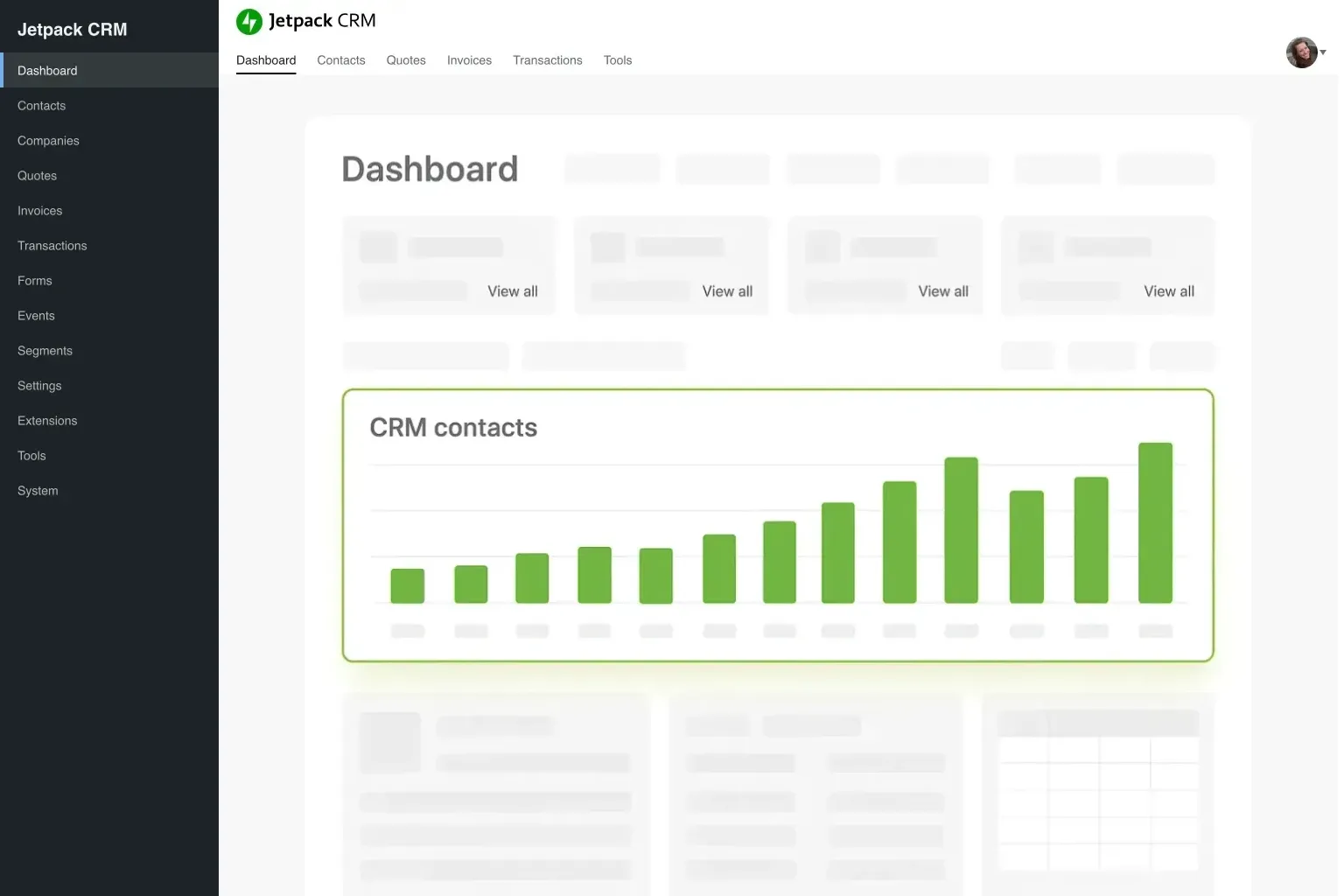
Picture it like the cockpit of a plane—all the dials and indicators showing you exactly how things are running. That’s what a CRM dashboard does by bringing data from across your business into one spot. Having this streamlined view helps you spot trends, catch issues early, and celebrate your wins.
- Tracks data as it happens
- Combines all your key numbers in one place
- Simple to use and easy to tailor to your needs
Instead of juggling spreadsheets or scribbling notes, your CRM dashboard becomes your go-to hub—a single source of truth that cuts through the noise and keeps you accountable. It’s where your business’s vital signs come to life.
Why Tracking Performance Matters More Than You Think
Keeping a close eye on performance is the heartbeat of smart business management. Tracking reports isn’t about bureaucracy—it’s about knowing exactly where your efforts are paying off and where you might need to shift gears.
Take sales activity reports, for example. They can reveal whether you’re making enough outreach calls or if follow-ups are slipping. Research shows making more than five call attempts per sale can bump your conversion rates by up to 70%. That’s the kind of insight you get when you track carefully.
With a good dashboard, you can:
- Spot daily trends before they become problems
- Pinpoint where your sales process is getting stuck
- Track core numbers like lead conversions and average deal values
Sales performance reports break things down further—like seeing which services or reps are hitting their targets. This data helps you tweak your approach to boost engagement and profits, and it also makes forecasting your next quarter’s results much easier.
When all your key numbers live in one place, decision-making stops being guesswork and becomes a responsive, informed strategy.
Having this kind of clear visibility means you’re steering your business with confidence rather than flying blind.
The Building Blocks of a CRM Dashboard That Works
A powerful CRM dashboard isn’t just about numbers—it’s about combining the right pieces so you get a complete picture.
- Sales Activity Reports: Keep track of calls, emails, meetings—basically, every interaction that moves the needle.
- Sales Performance Reports: See how sales break down by product, client, or team member, along with total sales and average deal size.
- Sales Forecast Reports: Use past trends to predict where your business is headed.
- Profitability Reports: Understand which clients, projects, or employees are adding the most value.
Bringing these together helps you not just monitor but anticipate what’s next. Say your lead conversion rate sits at 20%—that tells you how well your sales funnel is actually working. Add a visual sales pipeline, and you can quickly spot where leads are stalling.
| Key Metric | Why It Matters |
|---|---|
| Lead Conversion Rate | Shows how efficient your funnel is |
| Average Deal Size | Helps you track revenue per customer |
| Sales Cycle Length | Measures how quickly you close deals |
Each of these serves a specific purpose so your dashboard isn’t just a jumble of numbers, but a tool that helps you make smarter decisions every day.
How to Set Up Your CRM Dashboard, Step by Step
Building your CRM dashboard might feel overwhelming at first, but breaking it down into manageable parts makes it much easier to handle. Here’s a straightforward roadmap to get you started:
- Know What You Want to Track: Figure out which metrics truly matter. Is it sales calls, customer feedback, or overall profitability?
- Collect Your Data: Make sure you have all the right information, from sales numbers to interaction logs. Accuracy here sets the foundation.
- Pick the Right CRM Tool: Choose one that plays well with WordPress and your other business tools. For a deeper dive, check out this guide on integrating Jetpack CRM with popular WordPress plugins.
This approach keeps things practical and focused, transforming your dashboard from a bunch of stats into a vibrant, insightful workspace. Adding charts, lists, or tables gives you different ways to understand your data at a glance.
If you want to push further, exploring advanced features and tutorials can unlock new capabilities to tailor your dashboard even more.
Making Your Dashboard Truly Yours
What makes a dashboard invaluable is how well it fits your unique business needs. Forget one-size-fits-all—your dashboard should spotlight the numbers that speak directly to your goals, like lead conversions, deal sizes, or customer churn.
Here are some ideas to personalize your setup:
- Choose Your Metrics: Zero in on what moves the needle for you. If keeping customers around is a focus, include detailed retention stats.
- Make It Easy on the Eyes: Use charts, graphs, and tables to turn raw data into something easy to read and act on.
- Break It Up: Set sections for different parts of your business, like sales, marketing, or customer service.
Interactive widgets can help too. Imagine clicking into a visual sales pipeline to instantly spot where a deal is stuck—that kind of clarity saves time and sparks smarter action.
“Good data visualization isn’t just a nice touch—it’s essential, especially when every minute counts.”
Keep your dashboard flexible so it grows alongside your business. Linking related data means a change in one metric automatically refreshes the rest, giving you an up-to-the-minute snapshot that’s always relevant.
Bringing Your CRM Dashboard into WordPress
If you run your business on WordPress, integrating your CRM dashboard right into your site can be a game-changer. Instead of hopping between tools, you manage your customer info, sales data, and website all in one place.
This typically happens through plugins crafted for smooth integration. Many businesses have found success connecting CRM dashboards with popular WordPress tools, creating workflows that feel natural rather than clunky. For a practical walkthrough, this integration guide for Jetpack CRM is a great resource.
Some perks include:
- Keeping your data centralized and easy to access
- Cutting down on manual work with automation
- Seeing live updates right in your dashboard
Plus, managing sales and customer relationships right alongside your website content means saving time and avoiding data silos. Upgrading to newer CRM versions, like Jetpack CRM 6.5.0, can also bring improvements that make these integrations even smoother.
Tips for Solopreneurs Using CRM Dashboards
When you’re wearing all the hats, simplicity can be your best friend. A CRM dashboard for solopreneurs should cut through the clutter and deliver insights that help you make quick, smart decisions.
Here’s what to keep in mind:
Keep your dashboard clean. Focus on a few critical numbers—like lead conversion, average sale amount, and how many customers stick around. A tidy, well-organized interface saves you time and headache during busy days.
Set up real-time data feeds so you’re always in the loop—no waiting around for weekly updates. Elements like clickable sales pipelines or alert pop-ups guide your focus to what needs your attention now.
Take advantage of customization options, trimming features that don’t serve you. A modular dashboard that lets you add or remove widgets creates a smoother experience. For more on smart setups, you might explore this guide on the best CRM for small teams, which explains how a minimalist approach can turbocharge your workflow.
With the right dashboard, your CRM isn’t just a tool; it becomes your trusty partner in managing day-to-day tasks and planning ahead.
Watch Out for These Common CRM Reporting Mistakes
Even with powerful tools, it’s easy to trip up if your dashboard doesn’t actually fit your business’s needs.
A common misstep is trying to cram too much onto your screen. If everything feels cluttered or you include irrelevant data, you run the risk of missing what really matters.
Also, relying only on past data can leave you blindsided. Don’t wait for monthly reports to catch trends—mix in real-time insights so you can react as things unfold. Overloading your dashboard with too many widgets often backfires, making it harder to focus.
To avoid these, try this:
- Keep your interface simple—limit metrics to what truly impacts your goals.
- Balance real-time and historical data for a well-rounded picture.
- Regularly revisit and update your dashboard so it stays current with your priorities.
Remember: every number on your dashboard should have a clear purpose. Use visuals like graphs to spotlight trends instead of drowning in digits. A focused design helps you find issues fast and act before they grow.
How a CRM Dashboard Can Make Your Business Run Better
At its best, your CRM dashboard is more than just a place to stash data—it’s a tool that helps you work smarter, not harder. Bringing your key business numbers into one interactive space empowers you to make decisions based on what really counts.
Whether tracking how well you turn leads into customers, the size of your deals, or how long it takes to close a sale, every metric nudges you toward smoother, more efficient operations.
Using a thoughtful CRM dashboard strategy means tuning it to your unique needs, customizing features, and seamlessly linking it with places like your WordPress site. This saves time, cuts down errors, and gives you clearer customer insights—essential ingredients for growth.
Small tweaks to your dashboard can lead to big wins. Taking care to customize and refine it over time is an investment that pays off with clearer insights and better results. With everything you need right at your fingertips, you’ll be ready to tackle challenges head-on and run your business more efficiently.
FAQ: Common Questions About CRM Dashboards
What is a CRM dashboard?
A CRM dashboard is a visual display that aggregates and presents key performance indicators (KPIs) and metrics pertaining to your business. It helps you track everything from sales activity to customer retention in an easily digestible format.
Which KPIs should I focus on?
The relevant KPIs can vary by industry and business model. Commonly watched metrics include lead conversion rate, average deal size, sales cycle length, and customer retention rate. Tailor these based on your specific targets.
Can I customize the layout of my CRM dashboard?
Yes, most modern CRM solutions allow significant customization. You can choose which widgets to display and arrange them to highlight the metrics that are most important to your business.
How do integrations with WordPress work?
For WordPress users, integrations typically involve using plugins to link your CRM data with your website. This not only centralizes data management but also streamlines processes. You might find guides like Integrating Jetpack CRM with Popular WordPress Plugins useful.
What advanced features are available in CRM dashboards?
Advanced features can include predictive analytics, interactive data visualizations, dynamic tables, and real-time alert systems. These enhancements can significantly improve your ability to make data-driven decisions.
How often should I update my dashboard?
It’s best to review and update your dashboard regularly, at least once a month, to ensure that the information displayed remains relevant to your current business goals.

 airline